- Total Submission for Kidnappees - learn how to become vulnerable
- MoDesign RSS Feed - get the latest news the moment they get released
- Update your new product - learn how to benefit from the MoDesign philosopy
- Save Attachment Points - wear your corset at left pec or right pec
- Find a Partner - there is a great HUD available to bring people together!
- Linden$ Exchange - easy and fair money transfer
- Buy as Gift - learn how to buy MoDesign products for your special one
- Rezing Issues and Lost Items - be carefull when SL has issues rezing your items
- Inventory Windows - use severel windows to organize your inventory
Showing posts with label MoDesign Tip. Show all posts
Showing posts with label MoDesign Tip. Show all posts
MoDesign Tip: Update Your New Product
Update a new product, fresh from the vendors?
MoDesign always presents high quality product standards.
The MoDesign philosophy is to permanently evolve all products.
The MoDesign software follows a seamless plug in concept.
Code often is reused in several products.
This also ensures, that MoDesign products profit form all
benefits of Second Life scripts compiled in mono.
Due to the many products MoDesign offers, not all of them are
equipped with the latest versions of the various scripts.
The products in the vendors are in full operation and well tested.
However, some may profit if you update them even right after purchase.
This said, its up to you to use your new product right away,
or to check for updates at the MoDesign shop.
Updating is really easy, using MoDesign Easy Update. Just touch the updater at the MoDesign shop for instructions.
Take care and enjoy your MoDesign product,
Yours,
Mo.
PS: If you are satisfied, don't forget to tell your friends! ;)
MoDesign always presents high quality product standards.
The MoDesign philosophy is to permanently evolve all products.
The MoDesign software follows a seamless plug in concept.
Code often is reused in several products.
This also ensures, that MoDesign products profit form all
benefits of Second Life scripts compiled in mono.
Due to the many products MoDesign offers, not all of them are
equipped with the latest versions of the various scripts.
The products in the vendors are in full operation and well tested.
However, some may profit if you update them even right after purchase.
This said, its up to you to use your new product right away,
or to check for updates at the MoDesign shop.
Updating is really easy, using MoDesign Easy Update. Just touch the updater at the MoDesign shop for instructions.
Take care and enjoy your MoDesign product,
Yours,
Mo.
PS: If you are satisfied, don't forget to tell your friends! ;)


MoDesign Tip: Total Submission Script Set for Kidnappees
The MoDesign Total Submission products gives you the most detailed control about RLV options.
There are several ways these products and scripts are ought to be used.
If you want to use them as Kidnappee, it is ideal to use the Total Submission Script Set to only make the restrictions available that you comply with and give no access to features that violate your limits.
First, get the Total Submission script set at the MoDesign shop or the SL Marketplace.
Tips how to use the scripts:
As you want to give easy access to the RLV features at all times, its most convenient to have the scripts at hand any time. A good choice is your hair, or a invisible prim you wear at your head, that covers your hair, but lets your face open - so gags and the like can still be accessed.
For now, lets say you install the scripts to your hair.
The MoDesign Total Submission scripts support several plugins to control different RLV features. If you have no limits, just put all scripts of the set into your hair.
If you have limits - like you don't want to suffer IM restrictions, just remove the pluign that controls the RLV options you do not want to be used on you - the Ctrl. IM plugin in this case.
You can find an overview about all plugins here.
Next, to be available as kidnapee, its very helpful to organize your restraints in your #RLV folders. These folders can easily be accessed by the #RLV Folders plugin.
You will find a tutorial about how to set up #RLV Folders in general here.
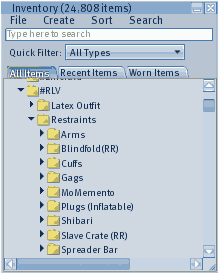
Just create a folder under your #RLV folder that contains your Restraints - I suggest to name that general folder but "Restraints" and then create sub folders with the different restraints you own.
Become a helpless Kidnapee
Now you but need to set your Total Submission set to make you totally helpless.
If you want to give up all control for a dedicated period of time, you can use the Time-Lock feature:
Remote Access
With the MoDesign Remote, your Total Submission product can be accessed sim wide, or even grid wide! Get controlled from all over SL!
If you are not firm with editing scripted objects:
If you are not firm with editing scripts, I recommend to use a prefab MoDesign Total Submission item, like:
How to find a Kidnapper
Ok, now you are ready to be kidnapped but don't know how to find a kidnapper?
Check out the RDF tracker to solve that! Its free!
There are several ways these products and scripts are ought to be used.
If you want to use them as Kidnappee, it is ideal to use the Total Submission Script Set to only make the restrictions available that you comply with and give no access to features that violate your limits.
First, get the Total Submission script set at the MoDesign shop or the SL Marketplace.

Tips how to use the scripts:
As you want to give easy access to the RLV features at all times, its most convenient to have the scripts at hand any time. A good choice is your hair, or a invisible prim you wear at your head, that covers your hair, but lets your face open - so gags and the like can still be accessed.
For now, lets say you install the scripts to your hair.
The MoDesign Total Submission scripts support several plugins to control different RLV features. If you have no limits, just put all scripts of the set into your hair.
If you have limits - like you don't want to suffer IM restrictions, just remove the pluign that controls the RLV options you do not want to be used on you - the Ctrl. IM plugin in this case.
You can find an overview about all plugins here.
Next, to be available as kidnapee, its very helpful to organize your restraints in your #RLV folders. These folders can easily be accessed by the #RLV Folders plugin.
You will find a tutorial about how to set up #RLV Folders in general here.
Just create a folder under your #RLV folder that contains your Restraints - I suggest to name that general folder but "Restraints" and then create sub folders with the different restraints you own.

Become a helpless Kidnapee
Now you but need to set your Total Submission set to make you totally helpless.
- Touch it (your hair in this example)
- Take Key
- Lock the item
in this example your hair
-> no way to remove it with RLV means - Go to Plugins -> Extras -> Expose
This will allow anybody to control all the plugins!
If you want to give up all control for a dedicated period of time, you can use the Time-Lock feature:
- Go to MoLock
- Go to Timelock
- Set up the timer(s) as desired and press Start.
More help about the timer can be found within the MoLock tutorials.
Remote Access
With the MoDesign Remote, your Total Submission product can be accessed sim wide, or even grid wide! Get controlled from all over SL!
If you are not firm with editing scripted objects:
If you are not firm with editing scripts, I recommend to use a prefab MoDesign Total Submission item, like:
- MoDesign Implant of Total Submission
This item can be worn invisible
e.g. make it big in size and wear it as invisible hat - MoDesign Rings of Total Submission
Worn like a typical BDSM-sign, as usual in RL
How to find a Kidnapper
Ok, now you are ready to be kidnapped but don't know how to find a kidnapper?
Check out the RDF tracker to solve that! Its free!
MoDesign Tip: Inventory Windwos
Ever wanted a second inventory window to organize your inventory? To drag and drop inventory items from one location of your inventory to an other?
Its that easy!

Its that easy!
- Open your inventory
- Go to: File
- Choose: New Window

MoDesign Tip: MoDesign RRS Feed
Want to stay tuned with the latest MoDesign News and Tutorial articles?
 Simply subscribe the RSS feed of the MoDesign FAQ and the RSS Feed of the MoDesign Blog with your favourite RSS feed program (e.g. your favourite mail program) - or just click the RSS Feed logo in the URL of your browser right now!
Its very easy and quick to do!
Yours, Mo.
Simply subscribe the RSS feed of the MoDesign FAQ and the RSS Feed of the MoDesign Blog with your favourite RSS feed program (e.g. your favourite mail program) - or just click the RSS Feed logo in the URL of your browser right now!Its very easy and quick to do!
Yours, Mo.
MoDesign Tip: Find a Partner
Looking for a partner to love or to play with, but its too hard to find one?
Eager to kidnap some nice prey - or to be kidnapped?
I do know how hard it can be to find a special one, but help is near!
In my shop I do offer a beta-version of the RDF Tracker.
The RDF Tracker is a remote HUD that helps you to find partners - or even kidnap them.
Its a great tool made by a friend and its for free!
Check it out!
Yours, Mo.
PS: If you find someone to play, try to find the dungeon ant my place ;)
Eager to kidnap some nice prey - or to be kidnapped?
I do know how hard it can be to find a special one, but help is near!
In my shop I do offer a beta-version of the RDF Tracker.
The RDF Tracker is a remote HUD that helps you to find partners - or even kidnap them.
Its a great tool made by a friend and its for free!
Check it out!
Yours, Mo.
PS: If you find someone to play, try to find the dungeon ant my place ;)
MoDesign Tip: Rezing Issues and Lost Items
If you have a hard time rezing items in world, please DO NOT try to rez again and again.
- If the item does not rez the first attempt, please wait some moments, then make sure your item is still safe in your inventory.
- Do not try to re-rez right away, but try again some time later!
- If SL has issues rezing and you try again and again, SL might 'eat' your item and you might loose it.
MoDesign Tip: Buy as Gift
Do you want to buy a perfect present for a special one?
Most of the MoDesign products are transfer, so you can buy your gift in advance and present it in the very special moment.
An other option is to buy your gift at the gift vendor at the MoDesign shop. You will find the gift vendor right next to the entrance. Everything you buy as gift will be delivered to the special gifted person of your choice.
You don't need a valentines day to present a surprise, don't you ;)
Most of the MoDesign products are transfer, so you can buy your gift in advance and present it in the very special moment.
An other option is to buy your gift at the gift vendor at the MoDesign shop. You will find the gift vendor right next to the entrance. Everything you buy as gift will be delivered to the special gifted person of your choice.
You don't need a valentines day to present a surprise, don't you ;)
MoDesign Tip: Wear Corset at Pec
Attachment points are always on shortage at Second Life. You are short of attachment points as well? Now you want to wear this wonderful corset, but you don't find a matching attachment point available?
Corsets made of prims have a great advantage. They usually make your body stiff. By doing that, most corsets also make the left pec and right pec attachment point stiff. - Those points usually move really ugly and are hardly usable for anything, so it is likely you have them vacant.
I do recommend to add add the MoDesign Attach Anywhere script to the corset before you proceed. You don't need to do that with MoDesign Corsets, as Attach Anywhere is already installed with MoDesign Corsets:
Corsets made of prims have a great advantage. They usually make your body stiff. By doing that, most corsets also make the left pec and right pec attachment point stiff. - Those points usually move really ugly and are hardly usable for anything, so it is likely you have them vacant.
I do recommend to add add the MoDesign Attach Anywhere script to the corset before you proceed. You don't need to do that with MoDesign Corsets, as Attach Anywhere is already installed with MoDesign Corsets:
- Rez your corset on some safe ground
- Drag the Attach Anywhere script from your inventory onto the corset
- Take the corset back to your inventory
- Wear your corset at the usual point
- Detach your corset
- Right click the corset in your inventory and choose:
Attach To -> left pec (or right pc)
-> Your corset will rez with some decent offset. - Edit the position of your corset
The use of a posing stand might be helpfull
When sattisfied: - Detach your corset and wear it again at the same attachment point
This is to save the position
MoDesign Tip: Linden$ Exchange
You are buying or selling Linden$ from time to time?
You are looking for fair exchange rates?
You are looking to exchange in US$, Euro or GB£.
There are 2 exchange platforms I deary can recommend:
VirVoX
At present you get very good exchange rates at
VirWoX: https://www.virwox.com
The rates are way better then anywhere else, as far as I know.
You exchange the Linden from resident to resident in a secure, fair way.
Payment options:
- Bank Transfer
- Paypal Express Checkout
- Moneybookers (credit card)
- DIRECTebanking
To register at VirWox, please use the following promotion link:
https://www.virwox.com?r=b53
ELDEX
An other very easy way to exchange is to use Eldex.
At Eldex you exchange without additional fees!
And you don't even need to register an account!
Please use the following promotion link to sign up:
https://www.eldexchange.eu/?r740
I use both systems myself to exchange Linden$
Both systems work very smooth and are absolutely trustworthy.
Have fun,
Mo.
You are looking for fair exchange rates?
You are looking to exchange in US$, Euro or GB£.
There are 2 exchange platforms I deary can recommend:
VirVoX
At present you get very good exchange rates at
VirWoX: https://www.virwox.com
The rates are way better then anywhere else, as far as I know.
You exchange the Linden from resident to resident in a secure, fair way.
Payment options:
- Bank Transfer
- Paypal Express Checkout
- Moneybookers (credit card)
- DIRECTebanking
To register at VirWox, please use the following promotion link:
https://www.virwox.com?r=b53
ELDEX
An other very easy way to exchange is to use Eldex.
At Eldex you exchange without additional fees!
And you don't even need to register an account!
Please use the following promotion link to sign up:
https://www.eldexchange.eu/?r740
I use both systems myself to exchange Linden$
Both systems work very smooth and are absolutely trustworthy.
Have fun,
Mo.
Subscribe to:
Posts (Atom)