Showing posts with label Product: Blindfold. Show all posts

MoDesign Blindfold


Looking for a really good looking blindfold?
With the MoDesign Blindfold you get what you are looking for.

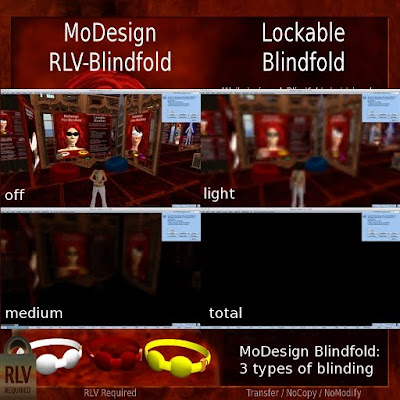
The MoDesign Blindfold is the very first Blindfold in Second Life that does not use a HUD but still is able to get you blind.

The MoDesign Blindfold enters a new dimension of virtual blindfold roleplay. Its 3 levels of vision restriction manages to transport the partial deprivation you experience with RL Blindfolds into a virtual online world. Here is, what customers say:

What Customers say
  • Hi Dear. Got that blindfold of yours! It is great for roleplays as you have two settings that are fair vision, but not really useful vision, And as it is hudless, it is even greater!
  • Brilliant!
  • The new blindfold is the best I have seen in SL.
  • Great way to introduce a good way of virtual blindfolding
  • Great! No more HUD!
  • I like how it looks and what it does.
  • I love the way it blinds

Features:
  • Blind via RLV features - no HUD needed
  • 3 levels of "blindness" to fit all your roleplay needs
  • Option: Hide on unlock - this will re-establish vision on unlocking
  • Grid wide access with MoDesign Global Remote
  • Hide names of people around
    This will make everybody anonymous for the wearer of the blindfold
  • Hide location info
    When you are blind, you don't know your position, do you?
  • Hide Maps
    When you don't know your position, you need no maps ...
  • Color change script included
  • Size script included


IMPORTANT!
This blindfold makes use of manipulating windlight graphics settings:
  • Please use a compatible viewer.
  • You might need to activate "Basic Shaders" and "Atmospheric Shaders" in the graphics settings!
  • Your Computer must be able to render Basic Shaders and Atmospheric Shaders!
Please also refer the Troubleshooting section of the Blindfold Tutorial.

Tutorial: Blindfold

Setup
The first time you wear the MoDesign Blindfold, a menu will open, the blindfold will be shown, but you will not be blinded. This is, so you can adjust the size of your Blindfold:
  1. Wear your blindfold.
  2. The Adjust Size menu will open.
  3. Use the Adjust Size plugin to adjust the size
  4. Use Edit of the viewer to adjust position.
  5. When done: Press "Save"
  6. Detach the Blindfold (IMPORTANT!)
The Blindfold is now ready to be used.


Usage
  • General:
    - When the Blindfold is visible, the vision of the sub is blocked.
    - The blindfold is worn at nose and there is a touch-zone around the eyes, even when the blindfold is off (invisible)

  • MoLock: Locking & Timelock:
    - The MoDesign Blindfold is equipped with MoLock. Please refer the MoLock Tutorial for details
    - When you lock the lock, the Blindfold will block vision immediately.

Blindfold:
  • On / Off
    Used to activate or deactivate the blindfold.
    When Off, the blindfold is invisible and vision is clear
  • Light / Medium / Total
    3 Levels of vision blocking:
    - Light: The vision is blurred
    - Medium: The vision is blurred and darkened
    - Total: The vision is all black

  • Blindfold Settings:
    - Hide Names / Show Names -
    The blind one will not read the names of pople in chat
    - Hide Loc / Show Loc -
    Hide Loc will hide location information
    - Hide Map / Show Map -
    Hide Map will hide World Map and Mini Map
    - Lock Mode -
    Choose whether the Blindfold should be turned on when the lock gets locked
    - Unlock Mode -
    Choose whether the Blindfold should be turned off when the lock gets unlocked


Troubleshooting

Q: The blindfold does not blind me, or but some objects get dark
A: Please set a higher level of graphics preferences, especially make sure that Basic Shaders and Atmospheric Shaders are enabled.
A: Your computer or your viewer is not able to process the required graphics performance.
--- Tutorial Main Page --- Troubleshooting --- MoDesign Tips ---